Why it matters
Video calls are easy. Making a video call part of a clinical record is harder: knowing who consented, which platform it ran on, how long it took, and where the consultation is documented afterwards.
The Ventrecs telemedicine module books the session against the patient and a clinician, creates a virtual encounter, and audits every step. A command centre shows the day as it happens, and the clinician can dictate a voice note and ask for a draft that is only ever a suggestion until it is accepted and signed.
- A live Command Centre for virtual care
- Google Meet, Zoom, Microsoft Teams, Jitsi or your own server
- Consent for the consultation, audio notes and AI assistance, recorded separately
- Voice notes with live transcripts in English and Arabic
- AI drafts that become an unsigned note only when accepted
- Every send, play and accept audited
See every consultation as it happens
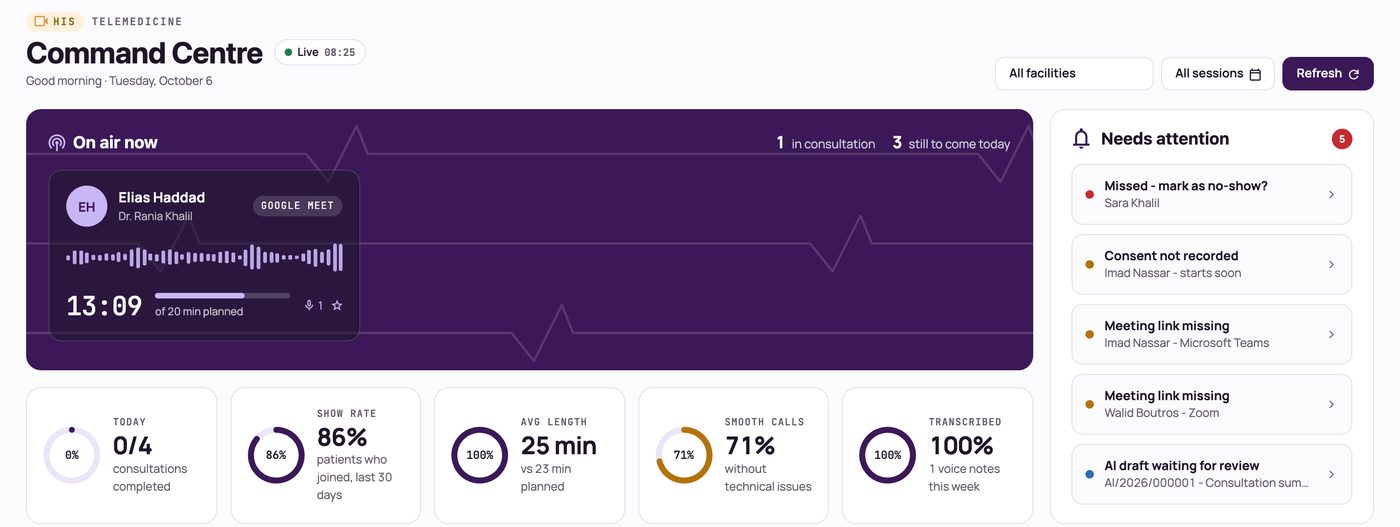
A live dashboard for clinics and hospitals that run virtual care: who is on air, what is coming next, and what needs attention. It refreshes every 30 seconds.
- On air now
- Each consultation in progress, with a live timer, its progress against the planned length, the platform, the voice-note count and the AI-consent flag. A call that overruns turns amber.
- Five rings
- Today's completed against total, the 30-day show rate, average against planned length, calls without technical issues, and voice notes transcribed.
- Two weeks at a glance
- Daily bars stacked by outcome: completed, live, planned, no-show and cancelled.
- As the signed-in user
- Every figure is computed for the current user, so facility rules and patient sensitivity apply. A section the user cannot read is left out, not shown as zero.
Fix the problem before the call starts
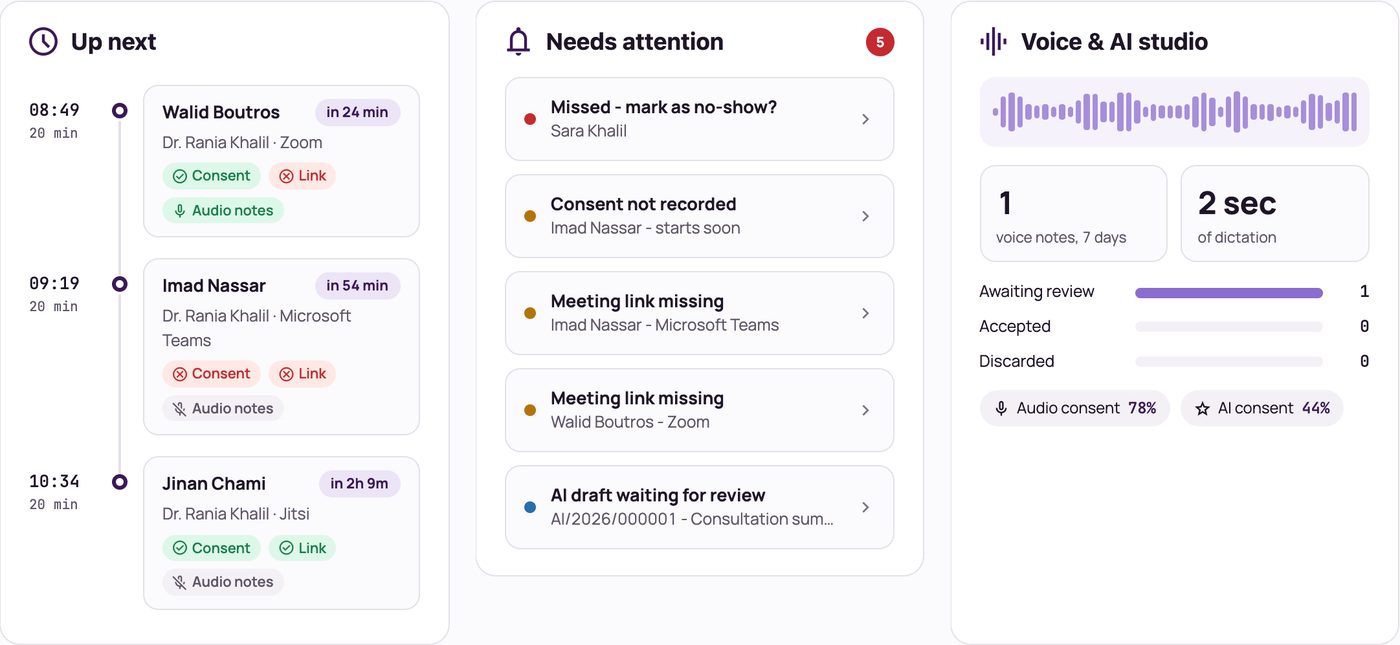
The next sessions show a countdown and readiness chips, and a needs-attention list puts the urgent items first. Each item opens the record it is about.
- Readiness chips
- Consent, meeting link and audio-note consent for each coming session, shown as ready or missing.
- Needs attention
- Overrunning calls, missed sessions to mark as no-show, consent not recorded or a link missing for sessions starting within the hour, AI drafts waiting for review, and voice notes without a transcript.
- Voice and AI studio
- Voice notes and dictation time this week, the AI draft funnel (awaiting, accepted, discarded), and the audio and AI consent rates.
Know your load
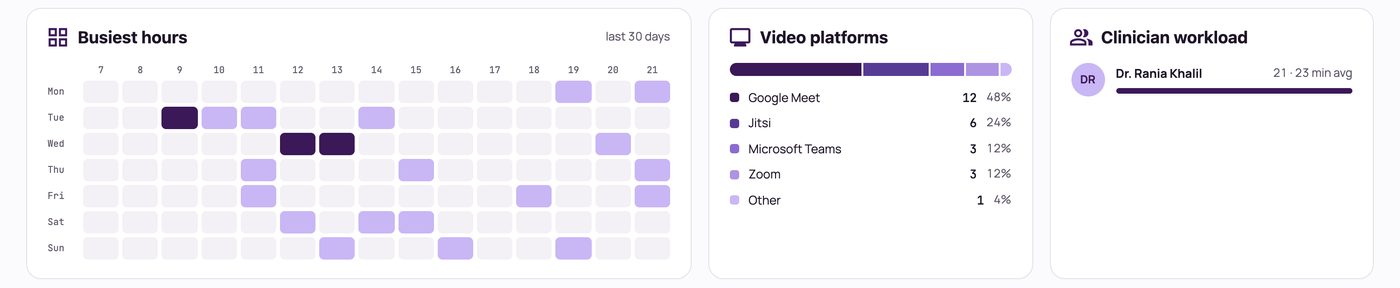
See when virtual care is busy, which platforms carry it, and how it is spread across your clinicians.
- Busiest hours
- A day-by-hour heat map of the last 30 days.
- Video platforms
- The share of consultations on each platform.
- Clinician workload
- Sessions and average length for each clinician.
Use the video service your organisation has approved
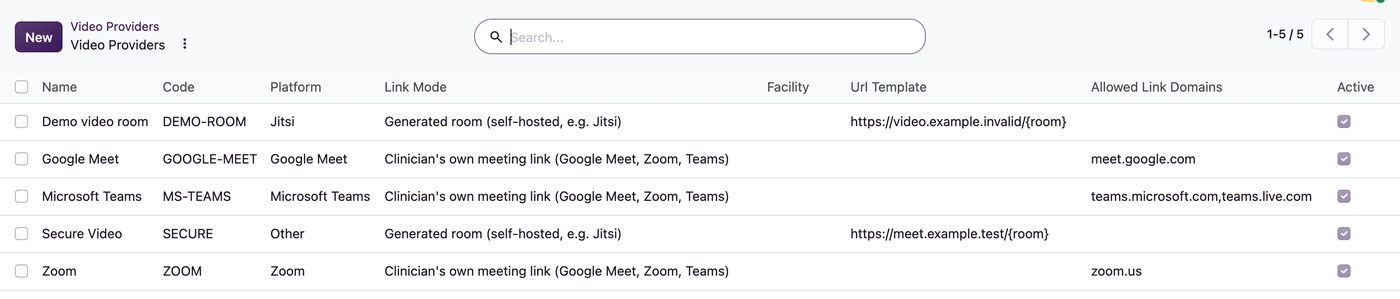
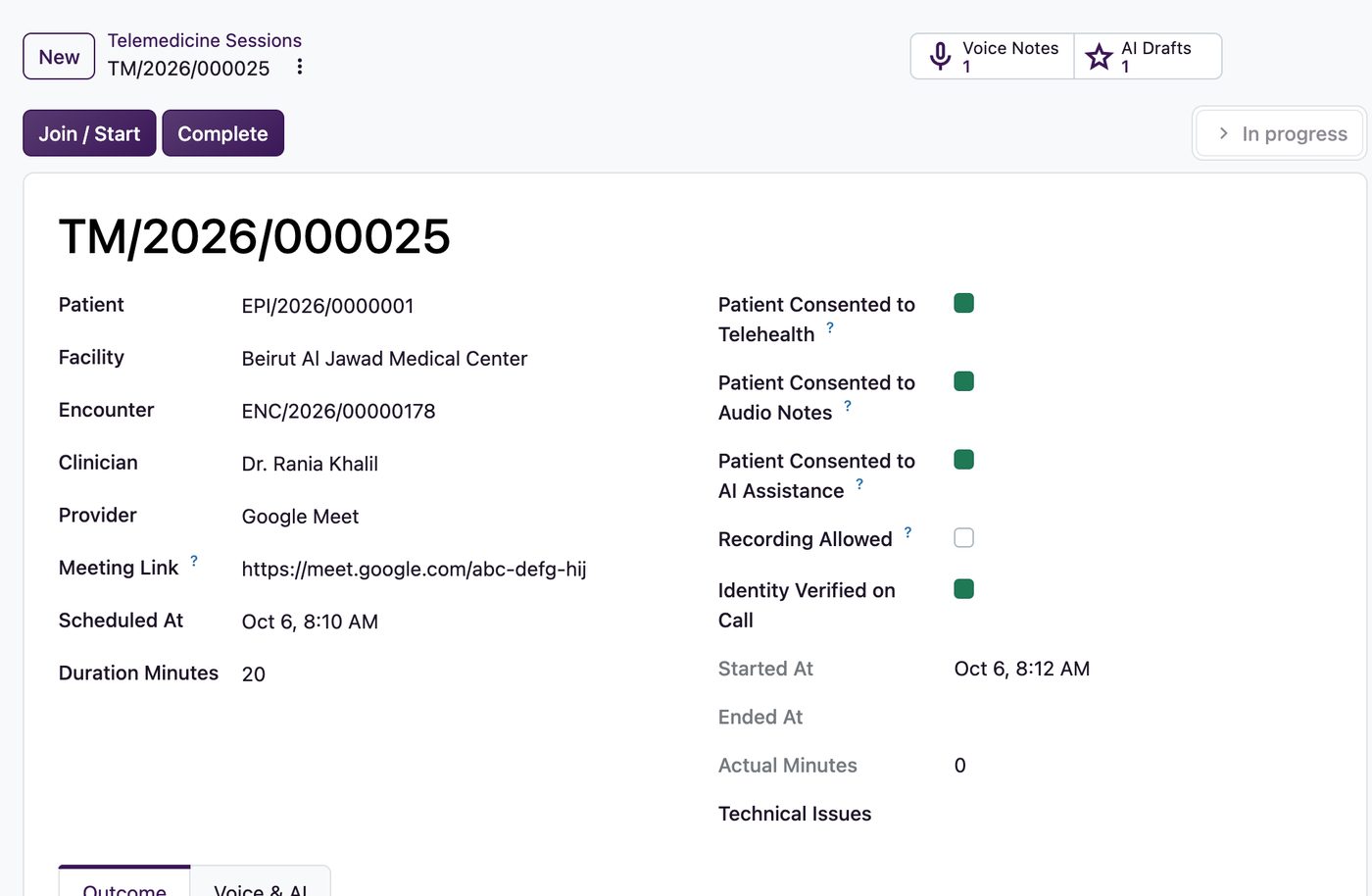
A provider is either a generated room on a server you host, or the clinician's own meeting link on Google Meet, Zoom or Microsoft Teams. The clinician joins in the provider's own page.
- Generated room
- For Jitsi or any self-hosted server. The system creates an unguessable room and builds the link from an HTTPS template.
- The clinician's own link
- For Meet, Zoom and Teams. The clinician pastes the meeting link on the session. It must be HTTPS and on the provider's allowed domains, cannot carry credentials, is visible only to clinical staff, and is cleared when the session ends.
- Inactive until approved
- Meet, Zoom and Teams ship inactive, and public Jitsi stays inactive. Activate a provider only when your organisation has approved it for patient consultations.
A consultation on the patient's record
A session is booked for one patient and one clinician at a facility, and links to a virtual encounter. Everything on it is audited.
- Consent first
- Joining needs the patient's consent to a remote consultation. Consent to audio notes and consent to AI assistance are recorded separately.
- Identity and outcome
- Completing a session needs identity verified on the call and a documented outcome. Technical issues are recorded.
- Invitation and clean-up
- An invitation email goes to the patient's registered address, and a session left open for more than four hours is closed automatically.
- If it does not happen
- Cancel with a reason, or mark no-show once the scheduled time has passed.
Dictate during the consultation, with consent
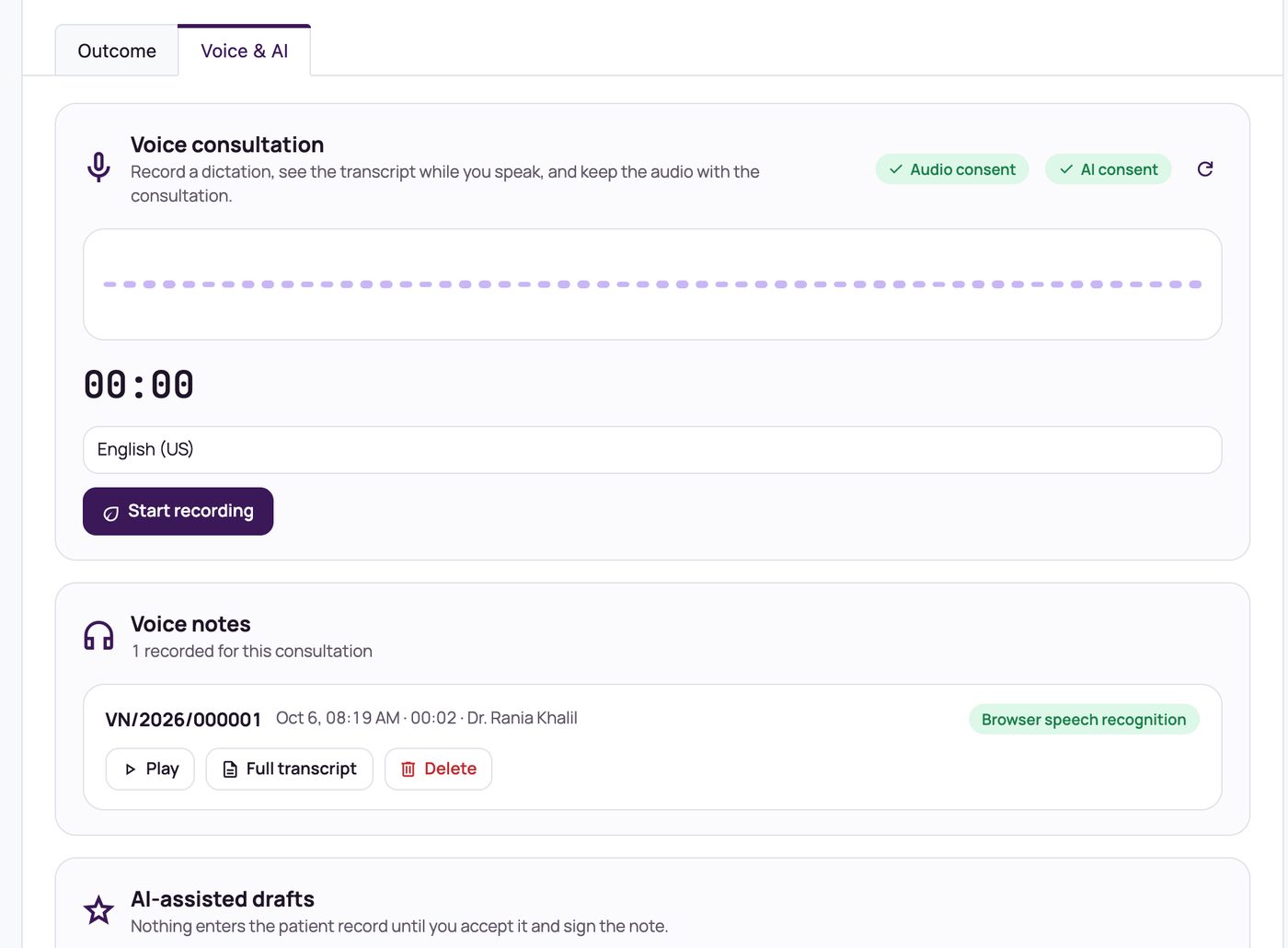
Record a voice note on the session, watch the transcript appear as you speak, correct it, and keep the audio with the consultation.
- Consent-gated
- Recording needs the patient's separate consent to audio notes, and the session must have started. Only the assigned clinician can record.
- English and Arabic
- Choose the spoken language: English or the Arabic variants of the six countries. Where the browser supports speech recognition (Chrome, Edge, Safari) the transcript appears live. Otherwise, transcribe on the server with an approved provider, or type it.
- Private audio
- Audio is stored privately. The only way to hear it is a playback route that checks the note's rules and the patient's facility and sensitivity, is never cached, and is audited every time.
- Delete with a reason
- Deleting destroys the audio and the transcript, and leaves a record of who, when and why.
AI drafts that a clinician must accept
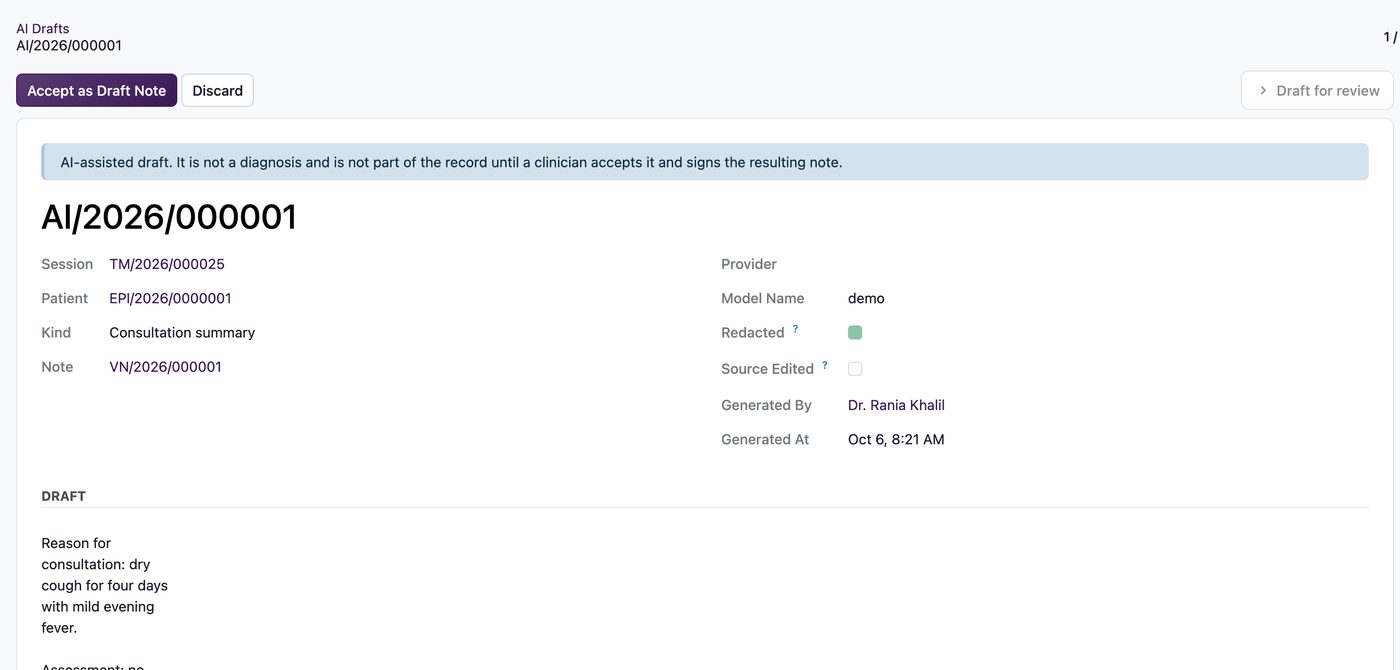
From the transcript, the system can draft a consultation summary, a SOAP note or patient instructions. Nothing enters the record until the clinician accepts it and signs the note.
- Your provider, your agreement
- Connect an OpenAI-compatible service (OpenAI, a gateway, or a self-hosted Whisper or vLLM server) or Anthropic Claude. A provider is unusable until the data-processing agreement is confirmed, and audio upload is a separate approval.
- Only the redacted transcript
- The patient's name, email, phone numbers, long numbers and dates are redacted before anything is sent, on a best-effort basis. The session needs the patient's separate consent to AI assistance.
- Accept, then sign
- Accept as Draft Note creates an unsigned clinical note with a provenance footer, and the clinician submits and signs it as usual. Discard keeps the record. Drafts cannot be deleted.
- Every send is audited
- Each send to a provider and each accept is audited, with the provider, the model and whether the transcript had been corrected.
Built-in safeguards
Browser speech recognition may send audio to the browser vendor's service, so a clinic that cannot accept that uses server transcription with an approved provider, or typed transcripts. Rules on AI use in clinical care differ by country: confirm them before enabling a provider. Today there is no patient waiting room or join page, no automatic reminder emails, no embedded video and no automatic meeting creation through Meet, Zoom or Teams.
Questions we are asked
Which video services does it work with?
Google Meet, Zoom, Microsoft Teams, Jitsi or any self-hosted server with an HTTPS room link. Meet, Zoom and Teams use the clinician's own meeting link. All of them are inactive until your organisation approves them for patient consultations.
Does the video run inside Ventrecs?
No. The clinician joins in the provider's own page. Ventrecs books, gates, audits and documents the consultation around it.
Is the patient's consent recorded?
Yes, in three parts: the remote consultation, audio notes and AI assistance. A session cannot start without the first, and voice notes and AI drafts cannot be used without the others.
Can we use AI to draft notes?
Yes, with a provider your organisation has approved. The provider is unusable until the data-processing agreement is confirmed, only the redacted transcript is sent, and a clinician must accept and sign every draft.
Where does the audio go?
It is stored as a private attachment on your system. Playing it is checked and audited. If you transcribe with a server provider, sending audio needs its own approval.
Talk to us about your setup
Tell us about your facility and current systems. We will reply within one working day.