Start with an analyzer register
A laboratory information system is only as reliable as its connection to the instruments. Before any configuration, list every analyzer that will exchange data with the LIS and record the same facts for each one. Do it with the people who run the bench, the instrument vendors and the IT team together.
| Field | What to record |
|---|---|
| Instrument | Make, model, serial number and the bench it sits on |
| Connection | Serial, network or file transfer, and who owns the cable, port or share |
| Protocol | ASTM-style, HL7 v2 or a vendor protocol, and which option is licensed on your unit |
| Direction | Results only, or worklist download and host query as well |
| Middleware | Whether a rules layer sits between the instrument and the LIS |
| Tests | Every assay the instrument runs, including calculated and repeat tests |
| Contacts | The vendor engineer, the biomedical lead and the LIS owner |
| Test environment | A test instrument, a training mode or a simulator to use before go-live |
Protocols: what the instrument speaks
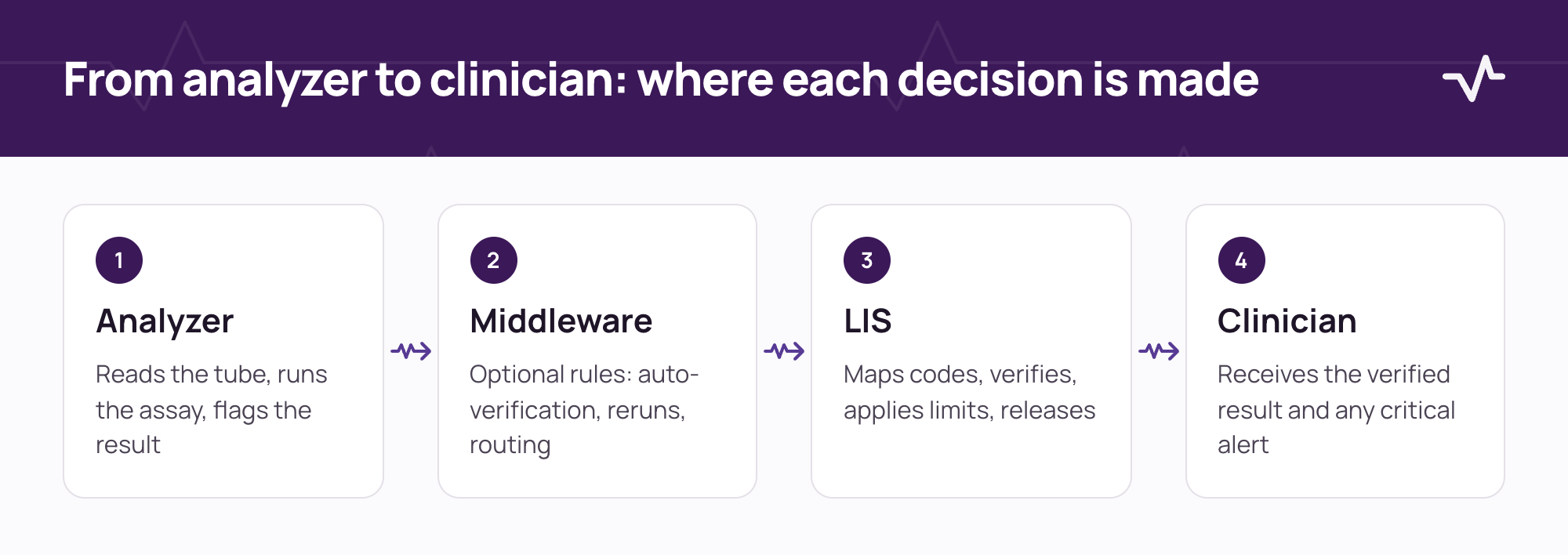
Many analyzers use ASTM-style protocols (published by CLSI as LIS01 and LIS02) over a serial or network link. Others send HL7 v2 messages, and some are reached only through the vendor's own middleware. Which of these is available depends on the instrument, its software version and the licence you hold, so confirm it with the vendor in writing.
- ASTM-style. A record-based protocol common on chemistry and haematology analyzers.
- HL7 v2. Message-based. Results typically arrive as result messages, and orders go out as order messages.
- Vendor middleware. The instrument talks to the vendor's software, which then talks to the LIS.
- File transfer. Results are written to a file or share that the LIS collects. Handle with care.
Twelve things to define for each analyzer
- Direction: results upload only, or worklist download and host query as well.
- Specimen identification: which barcode or identifier the instrument reads, and how it is matched to the order.
- Test code mapping: each instrument assay code against a LIS test, including panels and calculated tests.
- Units and decimals: who converts, and where rounding is applied.
- Flags and comments: how instrument flags, such as high, low, critical, clot or error, map to LIS flags.
- Reference ranges and critical limits: whether the LIS or the instrument holds them, which one wins, and how they vary by age and sex.
- Auto-verification: which results may be released without review, and who owns the rules.
- Repeats, dilutions and reruns: how they are identified and which value is reportable.
- Quality control: where control results are stored and how acceptance is applied before patient results are released.
- Errors and retransmission: what happens on a lost connection, a duplicate or a malformed message.
- Time and date: how clocks are synchronised across instrument, middleware and LIS.
- Downtime: how specimens are run when the LIS or the interface is down, and how results are entered afterwards.
Identification: the field that causes the most serious errors
A result on the wrong patient is the failure that matters most. Check how the barcode on the tube is generated, printed and read. Confirm symbology and length, leading zeros, and whether the same identifier can be reused over time. Print labels from the LIS on the real label stock and read them on every analyzer before go-live.
Data quality: what the LIS should and should not accept
Decide what the LIS does with a result it cannot trust. Rejecting silently, accepting silently and flagging for review are three different behaviours with three different risks.
- Unknown specimen identifier. Hold the result for review rather than attach it to the nearest match.
- Unmapped assay code. Reject it with a visible error that names the instrument and the code.
- Out-of-range value. Accept and flag, or hold, according to the rule agreed with the laboratory director.
- Duplicate result. Detect it and ignore it, with a log entry.
- Result for a cancelled order. Hold it for review and notify the bench.
Test in context
- Controls and known samples. Send specimens with known values and compare every field that arrives.
- A real day. Run a typical mix of routine, urgent, repeat and add-on specimens beside the current process.
- Failure on purpose. Disconnect the instrument, send a duplicate and a malformed message, and confirm the alert and recovery.
- Traceability. For any result, show which instrument, which run, which operator and which time.
Monitoring after go-live
Interfaces fail quietly. Agree what you will watch every day and who responds.
- A report of messages received, rejected and held, by instrument.
- An alert when an instrument has sent nothing for longer than its normal quiet period.
- A named person on each shift who reads the error queue.
- A weekly review of repeated errors, to fix the cause rather than the symptom.
Common problems and where they start
| Symptom | Typical cause | Where to look |
|---|---|---|
| Result on the wrong patient | Reused identifier or label mismatch | Identification and barcode rules |
| A test never returns | Assay code not mapped | Test code mapping |
| Values off by a factor | Unit or decimal conversion | Units and rounding rules |
| Duplicate results | Retransmission without duplicate control | Error and retransmission design |
| Critical value not flagged | Limits held in only one system | Reference ranges and critical limits |
Who signs off
- The laboratory director accepts the mapping, units, flags and limits.
- The instrument vendor or biomedical lead confirms the connection and settings.
- The LIS owner confirms the message handling, errors and monitoring.
- The evidence of each test is stored with the register.
For the wider discipline behind this list, read the integration readiness guide. If your laboratory is changing systems, see moving a laboratory to a new LIS without stopping the bench.
Frequently asked questions
What should the LIS do with an unknown specimen identifier?
Hold the result for review and alert the bench. Do not attach it to the closest match, because that is how a result reaches the wrong patient.
Do we need middleware between analyzers and the LIS?
Not always. Middleware helps when several analyzers need shared rules such as auto-verification or rerun logic, or when protocols differ. Decide per instrument and per laboratory.
Should we use ASTM or HL7 for an analyzer?
Both are used. The right choice depends on what the instrument supports and what is licensed on your unit. Confirm it with the vendor.
Who owns the test code mapping?
The laboratory owns the meaning of each test, IT implements the mapping, and any change is controlled like a change to the test catalogue.
How do we test critical results?
Use controls or known samples at limit values. Confirm the flag, the alert and the call procedure, not only the value.
Related Ventrecs pages
- Ventrecs Lab Specimens, results and instrument connectivity in one governed workflow.
- Integrations How Ventrecs scopes, tests and supports each connection.
- Ventrecs Connect The governed integration hub: monitoring, retries and reconciliation.
- Solutions by provider type Medical centres, laboratories, imaging centres, pharmacy groups and hospital networks.
Planning a deployment?
Tell us about your analyzers and current LIS. We can list the connections that need to be agreed first, and how each one will be tested.
More insights
- Healthcare integration readiness: scope every interface before go-live Most delays in a healthcare deployment come from interfaces nobody scoped. Use this guide to agree each connection, its owner and how it is tested before go-live.
- Moving a laboratory to a new LIS without stopping the bench A laboratory cannot pause for a cut-over. A phased plan, parallel running and reconciliation keep results flowing while the system changes.
- RIS/PACS integration checklist: 10 workflow decisions before go-live Most imaging integration problems are workflow questions that were never asked. Settle these ten decisions before go-live.