Start with the imaging flow
A radiology information system (RIS) manages orders, scheduling and reports. A PACS stores and serves the images. Between them sit the modalities that acquire the study. Each hand-off can lose or mislabel information, so the integration is really a set of agreements about who sends what, when, and under which identifier.
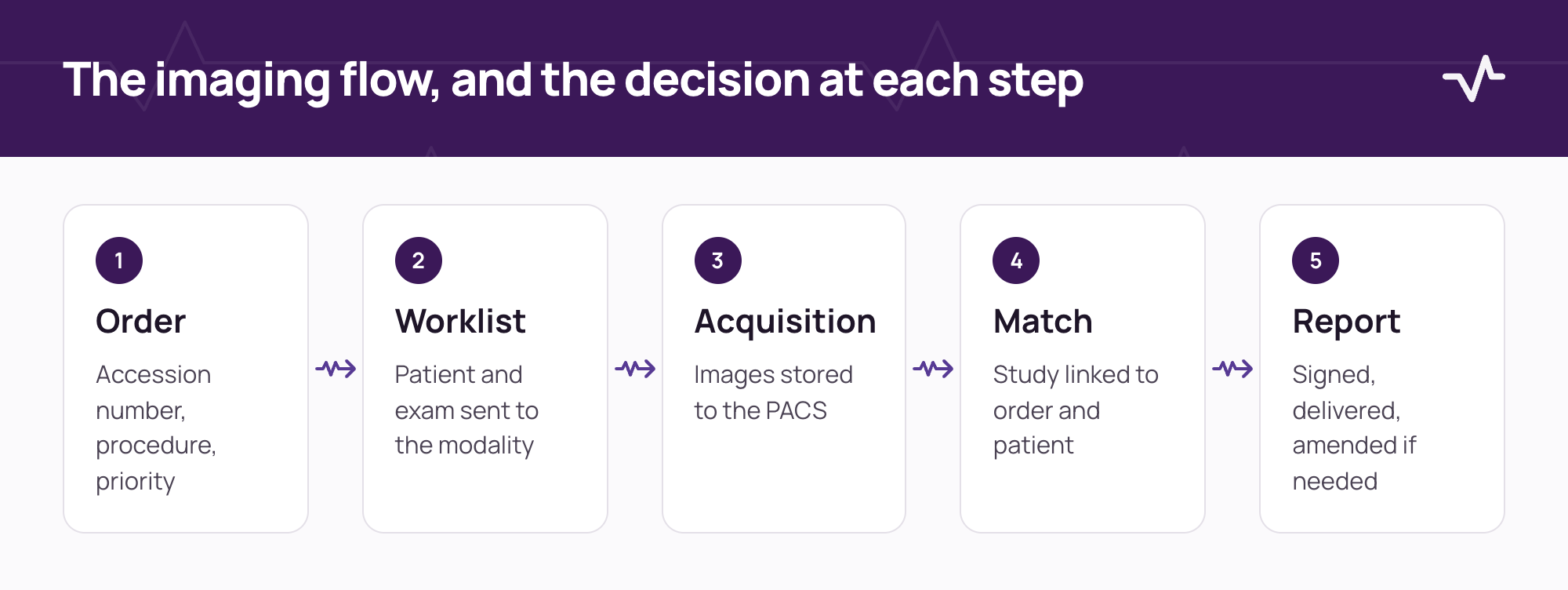
Ten workflow decisions to make before go-live
- Who creates the accession number, and where does it travel? One system should own it. It must be unique and appear on the order, the worklist, the images and the report.
- How does each modality get its worklist? Most modalities use the DICOM modality worklist. Decide whether the modality queries or is sent entries, and which fields it receives: patient identifier, name, date of birth, sex, accession number, procedure and station.
- Which patient identifier is used across systems? Agree the identifier, its format and how merged or corrected records are handled, because the RIS, the PACS and the modality must all agree.
- What happens when a study does not match an order? Unscheduled, emergency and mistyped studies will arrive. Decide how they are held, who reconciles them and who approves the link.
- How are procedure codes mapped? Map the procedure catalogue to modality protocols and modality types, and name who maintains the mapping.
- How do images reach the PACS and how do users open them? Agree the storage route, whether the PACS is queried through DICOMweb or another interface, and how a viewer opens the right study from the order with the right sign-in.
- How are reports created and returned? Decide the report format, the signed and amended states, how the report returns to the ordering system, and how critical findings are communicated.
- Who may see which images and reports? Define access by role and facility, rules for sensitive patients and external referrers, and how views are audited.
- How long are images kept, and where? Agree retention, archive tiers and how quickly prior studies must be retrievable for comparison.
- What is the downtime procedure? Decide how patients are imaged when the RIS or PACS is down, how demographics are entered manually, and how the study is reconciled afterwards.
Identification and mismatch handling deserve extra care
A study attached to the wrong patient is the most serious failure in this workflow. Do not rely on matching by name. Match on the agreed identifier and the accession number, and decide in advance what the system does when they disagree. A study that cannot be matched should be held for review rather than attached by guesswork.
Report delivery and critical findings
A report is only useful when it reaches the person who ordered the study. Decide how a signed report returns, how amendments are flagged, and how a critical finding is communicated and acknowledged.
- Signed report. It returns to the ordering system in the agreed format, with the signing radiologist and time.
- Amendment. It is marked as an amendment, with the reason, and sent again to the ordering clinician.
- Critical finding. It is communicated by a defined route, and the acknowledgement is recorded.
- Preliminary reads. If used, they are clearly labelled so nobody mistakes them for the final report.
Priors and comparison
Radiologists compare today's study with earlier ones. Decide where priors live, how quickly they must be retrievable, and how they are matched when a patient identifier has changed. An archive that holds the images but cannot find them by the current identifier does not help the reader.
Test cases for a RIS/PACS go-live
- A routine scheduled examination from order to signed report.
- An urgent walk-in with no prior order.
- A patient with a corrected or merged identifier.
- A study sent with the wrong accession number or patient details.
- A report amended after signature, and the amendment returning to the ordering clinician.
- A prior study retrieved for comparison from the archive.
- The whole flow again with the PACS or RIS switched off for part of it.
Who signs off
Radiology leadership accepts the worklist, matching and reporting rules. The PACS administrator accepts the storage, retrieval and viewer access. IT accepts the interfaces and monitoring. Keep the evidence of each test with your integration register, and compare the approach with the laboratory analyzer checklist.
Frequently asked questions
How should critical findings be handled in a RIS/PACS workflow?
Agree the route, the person who communicates the finding and where the acknowledgement is recorded, then test it as a scenario before go-live.
What is a DICOM modality worklist?
It is a list of scheduled examinations, with patient and procedure details, that a modality retrieves so that the technologist does not have to type them in again.
What is DICOMweb?
DICOMweb is a set of web-based services for storing, querying and retrieving DICOM studies. It lets other systems work with a PACS over standard web protocols.
Who should own the accession number?
One system, usually the one that creates the order. The key point is that it is unique and follows the study through the worklist, the images and the report.
How should emergency studies without an order be handled?
Agree a controlled route in advance: a temporary identifier, the study held for reconciliation, and a named person who links it to the right order afterwards.
Related Ventrecs pages
- Ventrecs Imaging Orders, worklists, reporting and PACS connectivity.
- Ventrecs Connect The governed integration hub: monitoring, retries and reconciliation.
- Integrations How Ventrecs scopes, tests and supports each connection.
- Solutions by provider type Medical centres, laboratories, imaging centres, pharmacy groups and hospital networks.
Planning a deployment?
Tell us about your modalities and PACS. We can map the worklist, identification and reporting decisions that need to be agreed first.
More insights
- Healthcare integration readiness: scope every interface before go-live Most delays in a healthcare deployment come from interfaces nobody scoped. Use this guide to agree each connection, its owner and how it is tested before go-live.
- Laboratory analyzer integration checklist: what to define before connecting your LIS Most analyzer problems come from details nobody wrote down. Use this checklist to define each instrument connection before configuration starts.
- Hospital information system RFP checklist: how to evaluate HIS, EMR, LIS, RIS and pharmacy requirements A good RFP asks for evidence, not features. Use this checklist to define scope, requirements, demonstrations and scoring before you issue it.