What a radiology information system does
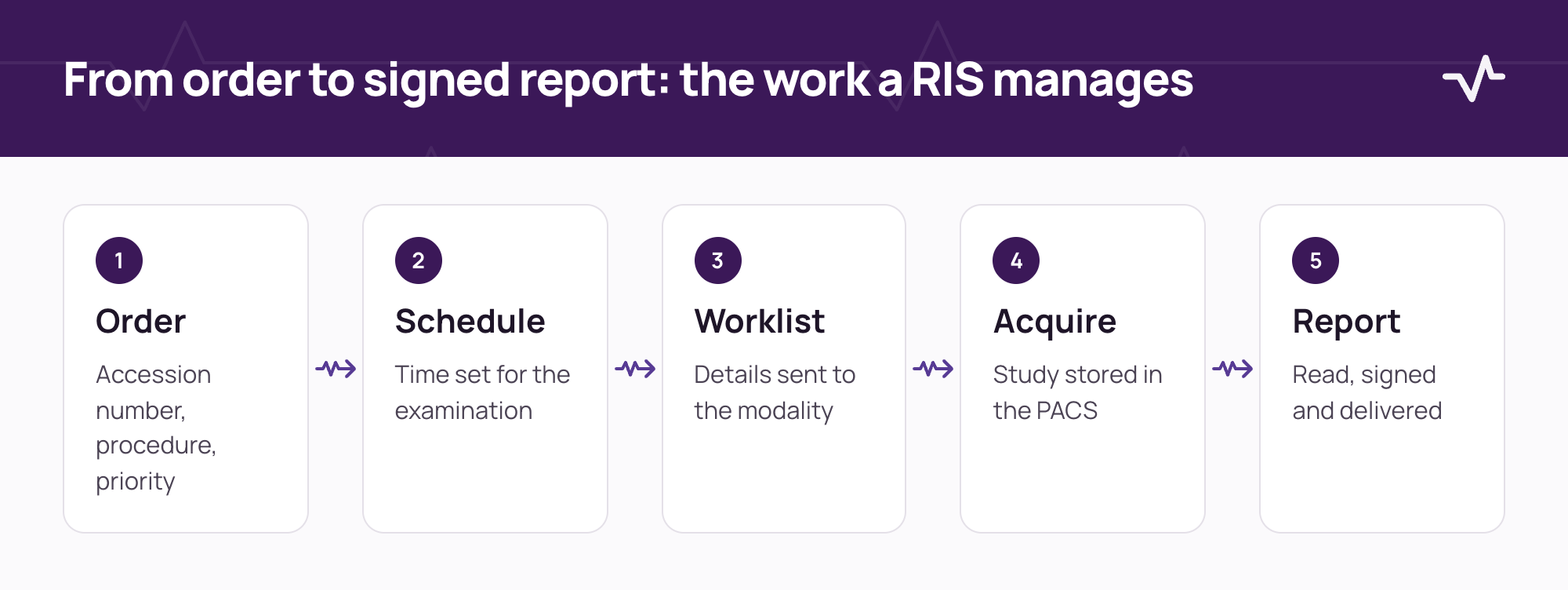
A radiology information system (RIS) manages the workflow around an imaging examination. It receives the order, schedules the patient, sends the examination details to the modality, tracks the study, supports the radiologist who reads it, and returns a signed report to the clinician who asked. It does not store or display the images themselves. That is the job of the PACS.
Radiology runs on identifiers. The accession number ties the order, the images and the report together, and the patient identifier ties them to the right person. Most of what a RIS does is keep those two identifiers consistent from the first request to the final report.
RIS, PACS and HIS: who does what
| System | Main job | Typical content |
|---|---|---|
| RIS | Workflow | Orders, schedules, worklists, reports and status. |
| PACS | Images | DICOM studies: storage, retrieval and viewing. |
| HIS or EMR | The patient record | Identity, encounters, clinical orders and results. |
| Modality | Acquisition | The scanner or X-ray unit that produces the study. |
DICOM is the standard that moves images and examination details between modalities and the PACS. HL7 is the standard most often used between a RIS and other systems for orders and results. A RIS that works with your existing PACS connects to it. It does not have to replace it.
The core functions
- Procedure catalogue. Each examination with its modality, such as CT, MR or ultrasound, and its default duration.
- Ordering and accession. Orders from the clinical record, each with a unique accession number and a priority.
- Scheduling. A time for each examination, with the order moving from ordered to scheduled.
- Modality worklist. Patient and examination details published to the modality, so the technologist selects the examination instead of typing it.
- Study tracking. Whether the images have arrived, whether they match the order, and where they are stored.
- Reporting. Report text, preliminary and final states, signature, and amendments after signing.
- Critical findings. A defined route for findings that need immediate action, with the acknowledgement recorded.
- Result delivery and audit. The signed report returned to the clinician, and a record of who viewed or changed what.
Where the controls matter most
| Step | What the system should enforce | What it prevents |
|---|---|---|
| Order | A unique accession number, and a procedure configured for the facility. | Examinations that nobody can trace. |
| Worklist | Only a scheduled order is published to the modality. | Studies acquired for unscheduled or cancelled orders. |
| Study matching | A study that does not match the order's patient, facility and accession number is held, not attached. | Images filed under the wrong patient. |
| Reconciliation | A held study is linked only through a proposal that a second authorised person approves. | One person linking a study by guesswork. |
| Signing | A report needs text before it can be signed, and a signed report changes only by amendment. | Silent edits to a signed report. |
| Viewing | Image access is granted for one study, for a short time, to the signed-in user. | Open-ended access to patient images. |
How a RIS connects to a PACS and other systems
The RIS and the PACS agree on three things: the accession number, the patient identifier and the procedure. The RIS publishes the worklist to the modality, the modality sends the images to the PACS, and the PACS, or a connector to it, tells the RIS that the study has arrived. Each connection needs an owner and a test plan. The RIS/PACS integration checklist lists the ten decisions to settle, and the HL7 v2 guide explains the message format a RIS commonly uses for orders and results.
Questions to ask before you choose one
- Does it work with the PACS I already run? Ask for the connection method and how a study is matched to an order.
- What happens to a study that matches no order? Ask to see it held, reviewed and linked, and who must approve.
- How does the technologist get the worklist? Check the worklist fields the modality receives and how often they refresh.
- How are reports signed and amended? Check the states, the audit of changes and how an amendment reaches the clinician.
- How are critical findings communicated? Ask who is told, by what route, and how the acknowledgement is recorded.
- How do radiologists open the images? Check that the viewer opens the right study from the order, and how access is granted and logged.
- Can requests and reports print in the languages we use? Check the printed documents, not only the screens.
- What is the downtime plan? Ask how patients are imaged and reconciled when the RIS or the PACS is unavailable.
How Ventrecs Imaging approaches it
Ventrecs Imaging is the radiology information system of the Ventrecs platform. It keeps the order, the study and the report on one patient record, and it connects to the PACS you already run over DICOM rather than replacing it.
- Order and worklist. Each order has an accession number and moves from ordered to scheduled to worklist published before the study is acquired.
- Studies are matched, not assumed. A study arrives held, until it is linked to an order with the same patient, facility and accession number.
- Two-person reconciliation. A held study is linked through a proposal that a second authorised person approves.
- Signed reports. A report is preliminary until it is signed, and a signed report changes only by amendment.
- Critical findings. A critical finding creates a notification that is acknowledged or escalated, and the acknowledgement is recorded.
- Short-lived viewer access. A viewer session is granted for one study, can be used once, and expires within a minute.
Connections to PACS, modalities and other systems are scoped, tested and supported per project. See Ventrecs Imaging and the solution for imaging centres.
Frequently asked questions
What is the difference between a RIS and a PACS?
A RIS manages the workflow: orders, scheduling, worklists and reports. A PACS stores, retrieves and displays the images. They exchange the accession number and the patient identifier so that each study is linked to its order.
Does a RIS store images?
Usually not. The images are stored in the PACS. The RIS keeps the order, the status and the report, and records where the study can be opened.
What is a modality worklist?
A list of scheduled examinations, with patient and procedure details, that a scanner retrieves so that the technologist does not type the details again.
What is an accession number?
A unique identifier for one imaging order. It appears on the worklist, the images and the report, so all three can be traced back to the same request.
Can a RIS work with an existing PACS?
Yes. Most connect to the PACS you already run. Agree the connection method, the identifiers and the mismatch rules, and test them before go-live.
Related Ventrecs pages
- Ventrecs Imaging Orders, worklists, reporting and PACS connectivity.
- Ventrecs Connect The governed integration hub: monitoring, retries and reconciliation.
- Integrations How Ventrecs scopes, tests and supports each connection.
- Solutions by provider type Medical centres, laboratories, imaging centres, pharmacy groups and hospital networks.
Planning a deployment?
Tell us about your modalities and PACS. We can walk through the worklist, matching and reporting rules you need before you choose or connect a RIS.
More insights
- RIS/PACS integration checklist: 10 workflow decisions before go-live Most imaging integration problems are workflow questions that were never asked. Settle these ten decisions before go-live.
- HL7 v2 explained: messages, segments and how hospital systems exchange them HL7 v2 is still how most hospital systems talk to each other. This is how a message is built, sent and acknowledged, and where interfaces go wrong.
- Healthcare integration readiness: scope every interface before go-live Most delays in a healthcare deployment come from interfaces nobody scoped. Use this guide to agree each connection, its owner and how it is tested before go-live.